Posts

How to play Drop Box videos offline?

You have to open the video while you are in Wi-Fi and If you mark it as a favorite (press the star) then it downloads locally and you can play it offline.
How to  Unprotect  a Protected Excel Worksheet Ever come across an Excel file that you can open and view but if you wanted to edit it, you can’t, since it is has been protected? And when you try to unprotect, it asks for a password.   Here are a couple of ways to overcome the situation. While, you may not be able to make the original document editable without the password, you can create editable copies. Here’s how. Situation 1: If the cells that you are interested in are selectable, then you can merely select the cells, copy the contents, and paste them into a new worksheet or file. The new worksheet would be perfectly editable. While, this may appear too simple, many people are not aware that this works. Situation 2: There is a possibility that the creator of the file has disabled Cell selection while protecting the worksheet. Obviously you can’t use the first method to deal with such worksheets, because without the ability to select the cells you c...
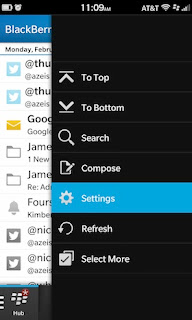
Change signature in BB 10

Image
How to change your email signature on BlackBerry 10 ·          From within the Hub, tap the overflow icon (3 dots) ·          Tap  Settings ·          Tap  Email Accounts ·          Choose the account for which you want to change the signature    Here you will see an option for  Auto Signature . You can either toggle to turn it off, or simply edit it in the text box. When you're done, go back to save.
Image
SMS Center settings for Etisalat -  UAE, Dubai Not able to sent and receive SMS In Blackberry, click on the SMS icon, click menu, go to options, you will see a section for SMS, under SMS, you will see a line saying that “Service Centre” straight after that, start typing the number +971506060000. That’s it; you can send and receive now SMS

How to reset to Blackberry Factory settings

For BlackBerry Desktop Manager 4.7 to 5.0.1 and BlackBerry Desktop Software 6.0 On 32-bit Windows XP, Windows Vista, and Windows 7: 1. On the computer, click Start > Programs > Accessories > Command Prompt. (Note: Windows Vista and 7, right-click and select Run As Administrator.) 2. Type cd C:\Program Files\Common Files\Research In Motion\Apploader and press Enter. 3. Type loader.exe /resettofactory and press Enter. On 64-bit Windows XP, Windows Vista, and Windows 7: 1. On the computer, click Start > Programs > Accessories > Command Prompt. (Note: For Windows Vista and 7, right-click and select Run As Administrator.) 2. Type cd C:\Program Files (x86)\Common Files\Research In Motion\Apploader and pressEnter. 3. Type loader.exe /resettofactory and press Enter. Or To access the Support Tools feature of BlackBerry Desktop Software, click on the Help button labeled with a question mark, then move the mouse over Support resources, and then click on S...

Tools for understanding and troubleshooting TCP – IP

Image
Tools for understanding and troubleshooting TCP – IP TCP – IP has tools built in, as a rule, in any operating system. They are utility programs, but are referred to as protocols. These include: ping arp ipconfig tracert ( traceroute in Linux ) These protocols are run from the command prompt in Windows. One way to get to a command prompt: Windows logo Run cmd.exe You can find out more about these protocols by appending /? to the name ping: ping /? returns this: ping sends a request for a response to a network device. If the device is configured to respond, ping tells you how long it took to make the round trip. This is the result of a ping to the IP address of google: You can also ping URLs: If you can ping an IP but not the associated URL, you have a DNS problem. If you want to ping non stop until the device responds, add a -t between ping and the IP address: ping -t 74.125.95.99 To pause this continuous ping:  CTRL-Break To terminate this continuous ping:  CTRL-...

Basic Network Troubleshooting

Things you need to know before you can ask an intelligent question correctly: Every beginner who comes here asks questions without providing the information necessary to answer that question. If you read and understand this tutorial, you will know how to ask a question properly. But you may not need to, because you may find the solution to your problem here. Definitions: LAN:  Local Area Network. Your local network WAN:  Wide Area Network. The larger network your LAN connects to. The first step on the path to the Internet. DHCP:  Dynamic Host Configuration Protocol. A server that assigns IP Address, Subnet Mask, Default Gateway and DNS Server values to your TCP-IP system. DNS:  Domain Name System. DNS is what translates the Google URL into googles IP address. Like an automated phone book. Router:  A network device with two interfaces; one side WAN, the other side LAN. They must be on different networks, or there is nothing for the router to do. The router...